Instagram Support Number 24/7: Essential 2025 Guide

Looking for the real Instagram support number 24/7? Here are the official contacts, what actually works in 2025, and the fastest ways to reach real help before you lose access.

Ida Reverie

Dec 3, 2025

📌 Quick Answer - Does Instagram have a support number?

Yes — Instagram has several official phone numbers. Please see the list below. We also provide you with the right support channel to use, depending on your scenario, such as Instagram’s in-app tools, Meta Verified chat, or official recovery forms.

Content Index

instagram support number 24-7 essential 2025 guide

Official Instagram Support Numbers (2025 Updated List)

Here are the actual phone numbers publicly connected to Instagram and Meta:


Official Instagram Number

Region/Source

Remarks

+1 650-543-4800

Instagram HQ (Menlo Park, CA)

Automated voicemail → directs you to help.instagram.com

+1 650-308-7300

Meta Platforms Support Line

Voicemail; no live agents

+1 650-543-4900

Older corporate contact

Voicemail or automated prompts, no escalation

+1 650-899-4500

Meta general line

Corporate reception only


👉 Instagram DOES have real phone numbers — but they are NOT support hotlines.
No matter how many times you call, no agent will answer, and they cannot assist with hacked or disabled accounts.


This is why most users feel stuck and frustrated.


Instagram intentionally shut down phone-based customer services sometime ago. Here’s why:

  • Security risk: phone calls make identity verification unreliable

  • Automation-first system: Meta relies on AI-driven review pipelines

  • Fraud prevention: phone support became a hotspot for impersonation scams

The voicemail messages aren’t a bug — they are by design.
Instagram wants users to use in-app reporting, automated workflows, and identity verification systems.

So yes, the phone numbers are “real,” but they are not a way to reach support.
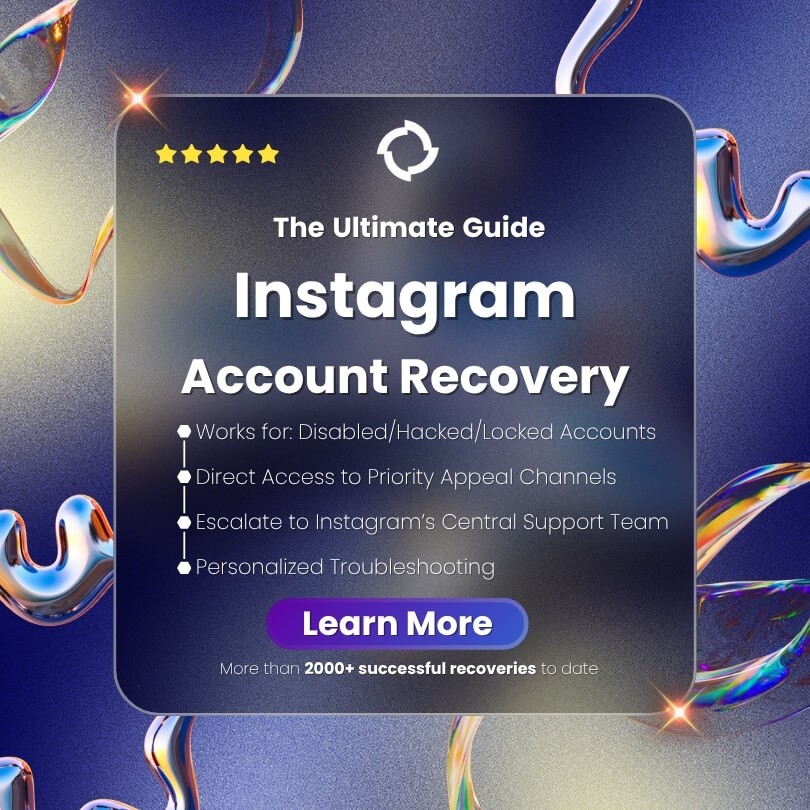

the ultimate guide to instagram account recovery-provides the most effective channels

WARNING: “Instagram Support Number 24/7” Scams Are Everywhere

Search “Instagram support number” on Google and you will see dozens of fake call centers pretending to be Instagram.

These scams are dangerous because scammers can:

  • Steal your login credentials

  • Take over your Instagram account

  • Charge fake “service fees”

  • Install malware on your device

  • Permanently lock you out

  • Commit identity theft


🚫 How to Spot a Fake Instagram Support Number


  • Claims to offer 24/7 live support (Instagram does not)

  • Promises to “recover your account in 10 minutes”

  • Asks for payment or credit card details

  • Requests your login code or backup codes

  • Uses WhatsApp / Telegram numbers

  • Claims to be “Instagram Recovery Center”

Rule of thumb:
If a number claims to solve your issue over the phone, it’s a scam.

The ONLY Real Ways to Contact Instagram Support (2025)

Below are the actual, legitimate methods Instagram uses for account support. These are the same routes Meta directs users to through voicemail.


3.1 In-App Support (Most Reliable for Everyday Problems)

Inside the Instagram app:

  1. Go to Profile


  2. Tap Menu (top right)


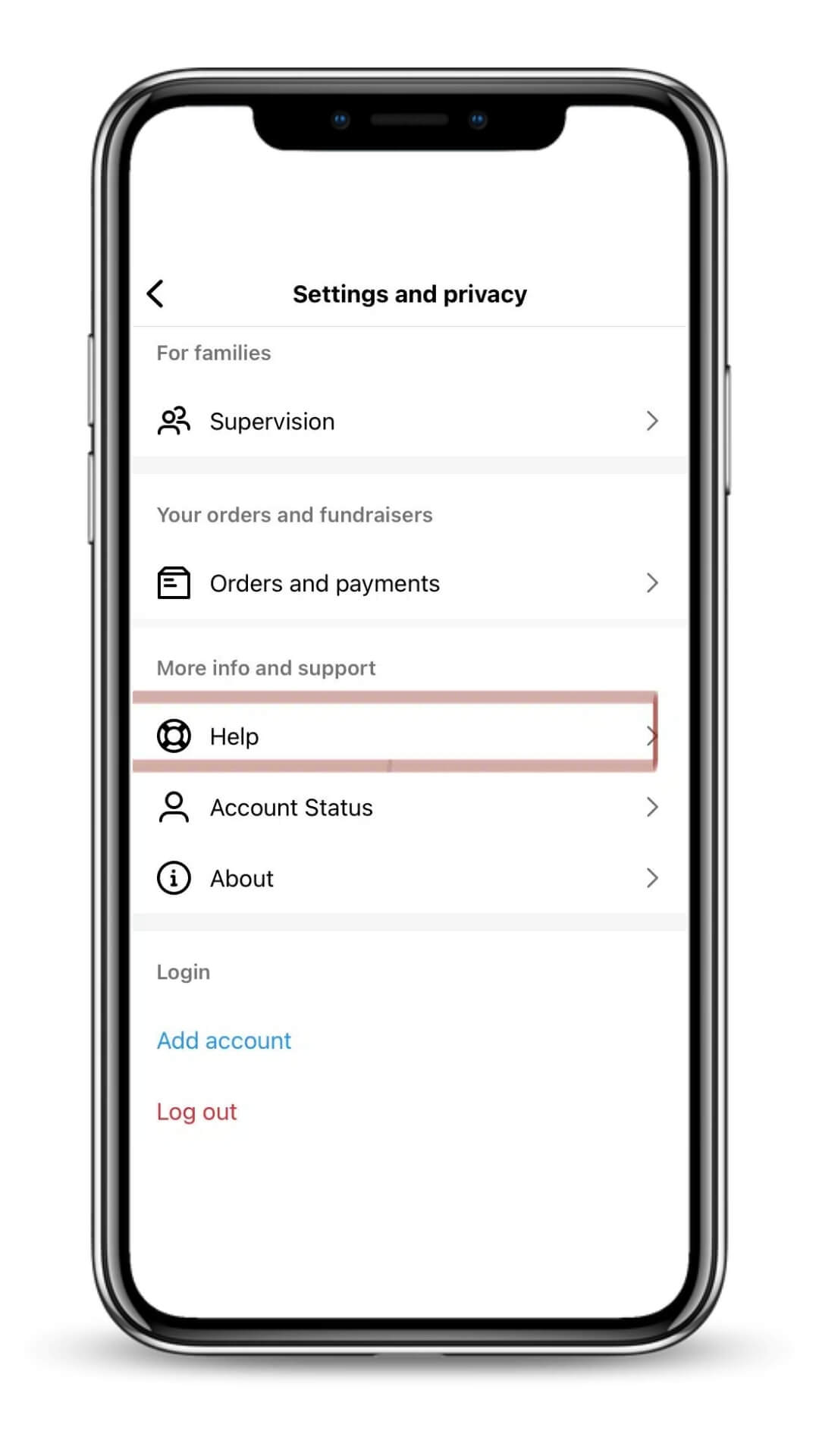
  3. Tap Settings and Privacy


    report a problem to instagram-in-app support-setting and privacy


  4. Tap Help


    report a problem to instagram-in-app support-help


  5. Tap Report a problem


    report a problem to instagram-in-app support-report a problem


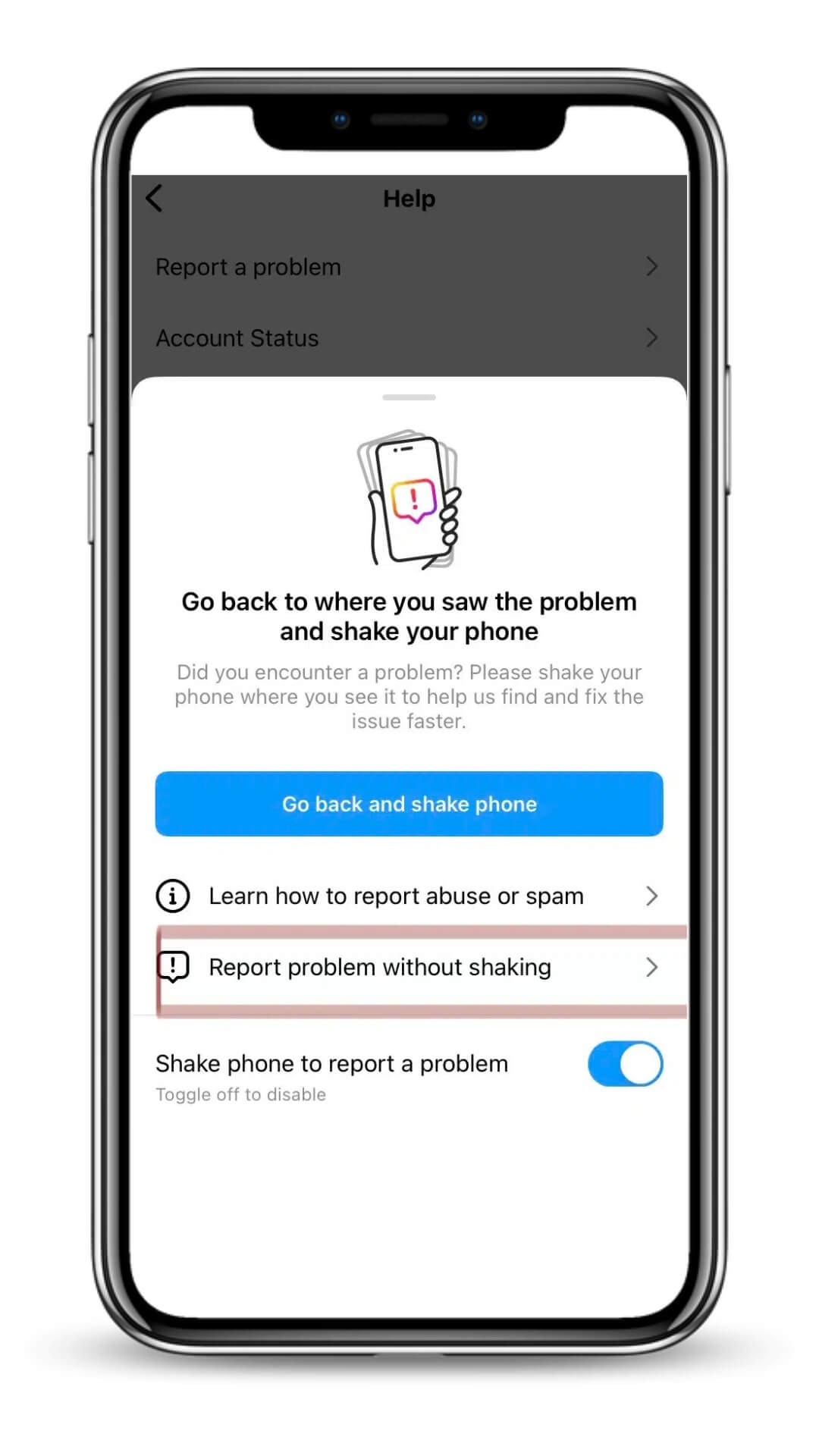
  6. Tap Report a Problem Without Shaking


    report a problem to instagram-in-app support-report without shaking the phone


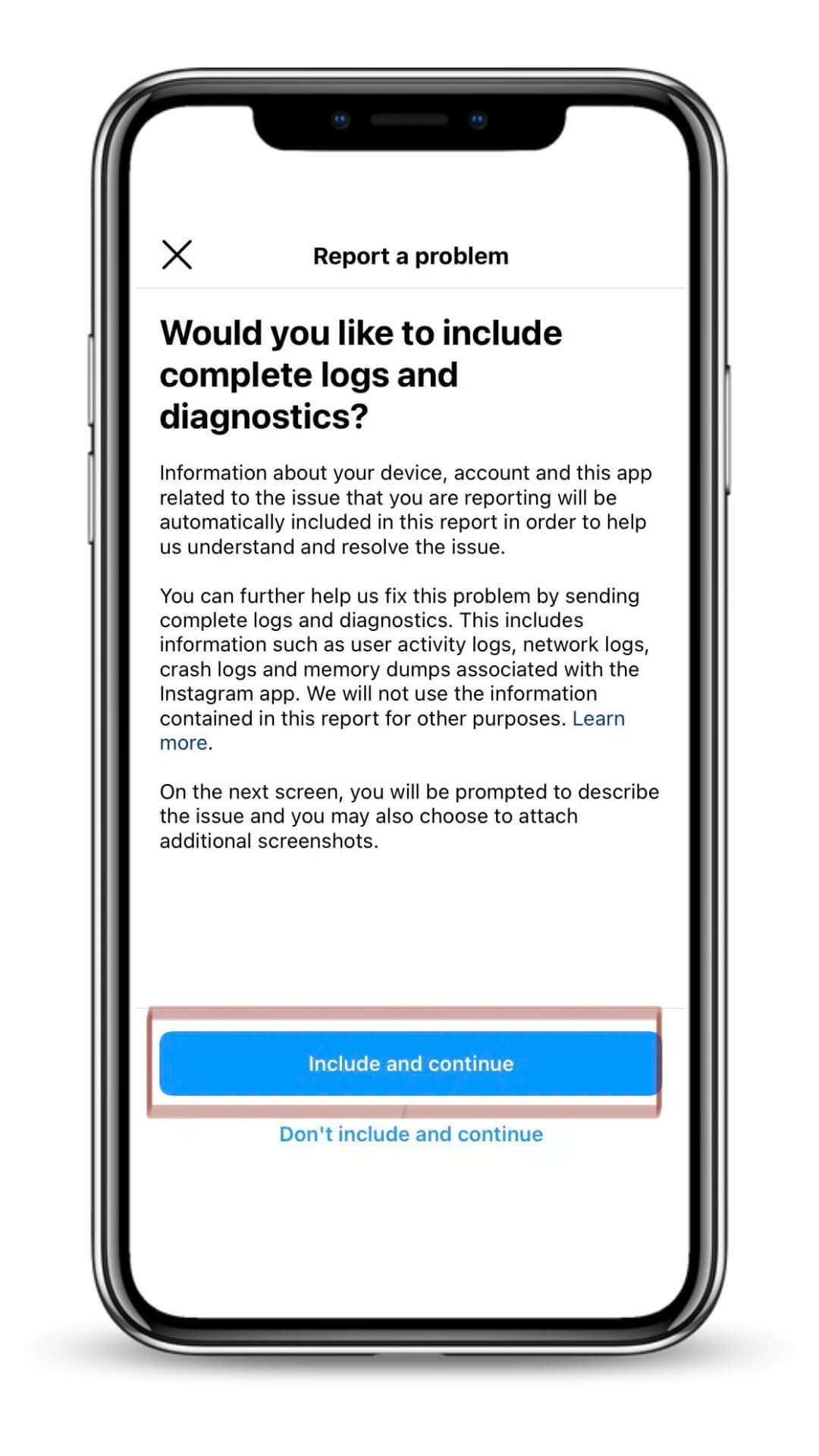
  7. Click "Include and Continue"


    report a problem to instagram-in-app support-include diagnostics


  1. On the next screen, you would be able to state down the exact issue you have. Please state the issues in as much detail as possible. Please include your Instagram username and your email. When you are done, click “Send”.


Useful for:

  • Bugs

  • Feature errors

  • Reporting impersonation


3.2 Instagram Help Center (Web)

https://help.instagram.com/

This is the hub Meta uses for all support. But unfortunately, for most issues, it fails to provide specific step-by-step solutions. And a lot of times, users would get trapped in the loop. So, this is useful only for information basis. You could get some standard, general information from the help center but not much more. The fact that you are here proves that the help center is not really "helpful" and most people are frustrated with it.


3.3 Meta Verified Support (Chat With a Real Human)

If you're Meta Verified, you can access:

  • Live support chat

  • Priority identity verification

  • Faster escalations

This is the only official way to talk to a real person. However, the feedback we gathered from users so far are a mixed bag. Some users did get "help", but most of them get canned answers. They are unable to help escalate cases under most circumstances.


3.4 Meta Business Support (For Business Accounts Only)

If your Instagram account is connected to a Facebook Page inside Meta Business Suite, you may qualify for:

  • Live chat

  • Email support

  • Callback scheduling (rare but possible)

Business accounts often receive faster attention. However, the feedback we gathered is that it is only kind of useful when you are dealing with ads issues (except for trying to recover banned ads accounts). For other issues, they only provide canned answers under most circumstances.


3.5 Case-Specific Support Channels


Hacked Account Form

https://www.instagram.com/hacked/

For advanced strategies on recovering hacked accounts, click here.


Disabled Account Appeal

https://help.instagram.com/contact/606967319425038

For advanced strategies on recovering disabled accounts, click here. (80% success rate method)


Copyright Dispute Form

https://help.instagram.com/contact/552695131608132


Impersonation Report

https://help.instagram.com/contact/636276399721841


These forms trigger specific review teams inside Meta.

The ONLY Real Ways to Contact Instagram Support (2025)

Below are the actual, legitimate methods Instagram uses for account support. These are the same routes Meta directs users to through voicemail.


3.1 In-App Support (Most Reliable for Everyday Problems)

Inside the Instagram app:

  1. Go to Profile


  2. Tap Menu (top right)


  3. Tap Settings and Privacy


    report a problem to instagram-in-app support-setting and privacy


  4. Tap Help


    report a problem to instagram-in-app support-help


  5. Tap Report a problem


    report a problem to instagram-in-app support-report a problem


  6. Tap Report a Problem Without Shaking


    report a problem to instagram-in-app support-report without shaking the phone


  7. Click "Include and Continue"


    report a problem to instagram-in-app support-include diagnostics


  1. On the next screen, you would be able to state down the exact issue you have. Please state the issues in as much detail as possible. Please include your Instagram username and your email. When you are done, click “Send”.


Useful for:

  • Bugs

  • Feature errors

  • Reporting impersonation


3.2 Instagram Help Center (Web)

https://help.instagram.com/

This is the hub Meta uses for all support. But unfortunately, for most issues, it fails to provide specific step-by-step solutions. And a lot of times, users would get trapped in the loop. So, this is useful only for information basis. You could get some standard, general information from the help center but not much more. The fact that you are here proves that the help center is not really "helpful" and most people are frustrated with it.


3.3 Meta Verified Support (Chat With a Real Human)

If you're Meta Verified, you can access:

  • Live support chat

  • Priority identity verification

  • Faster escalations

This is the only official way to talk to a real person. However, the feedback we gathered from users so far are a mixed bag. Some users did get "help", but most of them get canned answers. They are unable to help escalate cases under most circumstances.


3.4 Meta Business Support (For Business Accounts Only)

If your Instagram account is connected to a Facebook Page inside Meta Business Suite, you may qualify for:

  • Live chat

  • Email support

  • Callback scheduling (rare but possible)

Business accounts often receive faster attention. However, the feedback we gathered is that it is only kind of useful when you are dealing with ads issues (except for trying to recover banned ads accounts). For other issues, they only provide canned answers under most circumstances.


3.5 Case-Specific Support Channels


Hacked Account Form

https://www.instagram.com/hacked/

For advanced strategies on recovering hacked accounts, click here.


Disabled Account Appeal

https://help.instagram.com/contact/606967319425038

For advanced strategies on recovering disabled accounts, click here. (80% success rate method)


Copyright Dispute Form

https://help.instagram.com/contact/552695131608132


Impersonation Report

https://help.instagram.com/contact/636276399721841


These forms trigger specific review teams inside Meta.

Instagram Support “Scenario Map” — Choose Your Route

Your problem determines your support path.


✔ Account disabled

➡ Appeal via ID verification
➡ Use disabled account form
➡ Avoid repeated submissions (lowers trust)


✔ Account hacked

➡ Use Instagram.com/hacked
➡ Complete selfie video verification
➡ Secure email + phone


✔ Email changed

➡ Use login → “Need more help?”
➡ Verify old email or phone number


✔ Lost 2FA access

➡ Use backup codes or login recovery form


✔ Impersonation issues

➡ Report via impersonation form
➡ Provide government ID


✔ Business account restricted

➡ Use Meta Business chat via Business Suite

This map prevents users from choosing the wrong form — the most common cause of failed recovery.

Best Alternatives to Instagram Phone Support

Since phone support is not really helpful, here are the methods that actually work:


⭐ 1. Use forms that trigger human review

Some forms are more likely to be escalated.


⭐ 2. Submit the correct appeal for your scenario

Wrong form = automatic rejection.


⭐ 3. Use clear ID documents

Blurry or incorrect IDs get denied.


⭐ 4. Avoid flooding Instagram with appeals

Rate limits reduce trust.


⭐ 5. Meta Verified = Fastest human support

Paid, but effective for urgent cases.


⭐ 6. Rebuild your trust score

If flagged, wait 24–48 hours before resubmitting.


These alternatives produce far better results than calling phone numbers that don't offer support.

Need More Than Forms and Voicemails? A Proven Recovery System That Actually Works

If your account is disabled/hacked/locked and you’ve tried Instagram’s forms, help pages, and in-app support but still can’t get your account back, you’re not the only one. Most cases stall because appeals get filtered by AI, never reaching a real human.

That’s why the Instagram Account Recovery Guide is created.

— a practical playbook based on thousands of real recoveries.


Inside, you’ll learn:

  • The priority appeal channels that trigger human review

  • The direct channel to Instagram's central support team

  • The exact sequences for hacked, disabled, or locked accounts

  • How to write appeals that avoid automated rejection

  • What to do when your case feels “stuck”

If your account holds business data, clients, or years of memories, you shouldn’t rely on trial-and-error. This guide shows the fastest working paths available today.

👉 Learn more: Instagram Account Recovery Guide

FAQ – Instagram Support Number 24/7 (Fast Answers)


1. Is there a real Instagram support phone number?

Yes — Instagram lists several official phone numbers, but none offer live support. All calls go to automated voicemail telling you to visit the Help Center. Instagram does not provide phone-based customer service, even for hacked or disabled accounts. Use in-app support or Meta-approved forms instead.


2. Does Instagram have 24/7 customer service?

Instagram does not provide 24/7 live support through phone or chat. The only 24/7 tools available are automated systems: in-app reporting, identity verification, and Help Center forms. Meta Verified users may access live chat, but availability varies by region.


3. Can Instagram call me back?

No. Instagram does not offer callback services. Any message claiming “Instagram will call you back” is a scam. Instagram only communicates through in-app notifications and emails sent from @mail.instagram.com or @support.facebook.com.


4. What number do I call for hacked Instagram accounts?

There is no phone number for hacked accounts. Even official Instagram numbers cannot help. The correct recovery path is:

  1. instagram.com/hacked → 2) Identity verification → 3) Secure email/phone.
    This is the only method recognized by Instagram’s security team.


5. Why does no one answer the Instagram phone numbers?

Because Instagram does not staff live call centers. Due to massive user volume, Meta transitioned all support to digital workflows years ago. Phone numbers exist for corporate reasons but are not intended for customer support.


6. Are Instagram support numbers on Google real?

Most numbers on Google are fake. Only the numbers listed on Meta/Instagram’s corporate documents are official — and even those do not offer customer service. Avoid any numbers claiming to recover your account for a fee.


7. How do I contact a real person at Instagram?

The only legitimate way to reach a human is through Meta Verified support or Meta Business Support. Regular users must rely on in-app tools and official forms. Phone support does not exist.


8. Is there an Instagram support number for disabled accounts?

No. Disabled accounts cannot be restored through phone calls. You must use the official Disabled Account Appeal Form and complete identity verification. Phone calls will not affect your case.


9. What if I gave my login code to a fake support number?

Change your password immediately, revoke unrecognized devices, and secure your email. If the hacker gained full access, use instagram.com/hacked to restore control. In severe cases, you may need identity verification.


External Authoritative Sources

These official sources could help provide you with the right information and help protect you against scam and fraud:

Meta Transparency Center: https://transparency.meta.com/
Instagram Help Center: https://help.instagram.com/
FTC Scam Warnings: https://consumer.ftc.gov/articles
CISA Cybersecurity Tips: https://www.cisa.gov/


Conclusion

Instagram does have official phone numbers — but they won’t connect you to customer service. Every number routes to voicemail because Instagram handles support exclusively through digital channels.

If your account is hacked, disabled, impersonated, or blocked, the only effective methods are:

✔ In-app support
✔ Meta Verified chat
✔ Meta Business Suite
✔ Official recovery forms

By understanding how Instagram’s support system actually works, you avoid scams, save time, and dramatically increase the chance of resolving your issue.
More Insights

instagram account disabled for no reason-check out the 80 percent succss rate method

[

Disabled Instagram Account Recovery

]

Instagram Account Disabled for No Reason? The 80% Success Rate Method (2025 Guide)

Instagram disabled your account without warning? Most people try basic appeals and lose everything. Don't be the 85% who fail. Use our 4-step emergency method.

instagram account disabled for no reason-check out the 80 percent succss rate method

[

Disabled Instagram Account Recovery

]

Instagram Account Disabled for No Reason? The 80% Success Rate Method (2025 Guide)

Instagram disabled your account without warning? Most people try basic appeals and lose everything. Don't be the 85% who fail. Use our 4-step emergency method.

instagram account disabled for no reason-check out the 80 percent succss rate method

[

Disabled Instagram Account Recovery

]

Instagram Account Disabled for No Reason? The 80% Success Rate Method (2025 Guide)

Instagram disabled your account without warning? Most people try basic appeals and lose everything. Don't be the 85% who fail. Use our 4-step emergency method.

instagram account hacked and email changed-follow the step-by-step guide

[

Hacked Instagram Account Recovery

]

Instagram Hacked & Email Changed? 2025 Fast Recovery Guide

Instagram hacked and email changed? Act fast—recovery gets harder every hour. This 2025 guide shows the exact steps to get your account back.

instagram account hacked and email changed-follow the step-by-step guide

[

Hacked Instagram Account Recovery

]

Instagram Hacked & Email Changed? 2025 Fast Recovery Guide

Instagram hacked and email changed? Act fast—recovery gets harder every hour. This 2025 guide shows the exact steps to get your account back.

instagram account hacked and email changed-follow the step-by-step guide

[

Hacked Instagram Account Recovery

]

Instagram Hacked & Email Changed? 2025 Fast Recovery Guide

Instagram hacked and email changed? Act fast—recovery gets harder every hour. This 2025 guide shows the exact steps to get your account back.